I asked an HR manager once what task she dreaded most, and she didn’t even pause before saying “probation deadlines.” Not payroll. Not recruitment. Probation tracking. Because it’s the kind of thing that lives in a spreadsheet tab nobody opens, and by the time someone remembers to check it, the employee is already three weeks past their probation end date with zero documented reviews.
Spreadsheets don’t send you a message. They just sit there. Sticky notes get buried under coffee cups. And when the whole probation process depends on someone’s memory, things fall apart, quietly, until suddenly they don’t.
A proper Human Resource Management System (HRMS) takes that pressure off. It keeps probation dates, review schedules, manager feedback, and the final confirmation decision in one system instead of scattered across five different tools. Nobody has to remember anything. The system remembers for them.
What Is Employee Probation Management?
Think of probation as a trial run, but one with structure. Both sides get to find out if this is actually going to work. The company lays out what it expects, performance goals, attendance, how the person fits with the team, and the new hire gets space to figure things out without a permanent label attached yet.
HR usually owns the paperwork side of this. Managers own the closer, day-to-day part, the feedback, and the performance evaluation that actually reflects how someone’s doing on the ground. Neither side can really skip their part and expect a fair outcome.
How HRMS Simplifies Probation Management
Manual tracking runs on memory. HRMS runs on structure instead, and that difference matters more than people expect until they’ve lived through both.
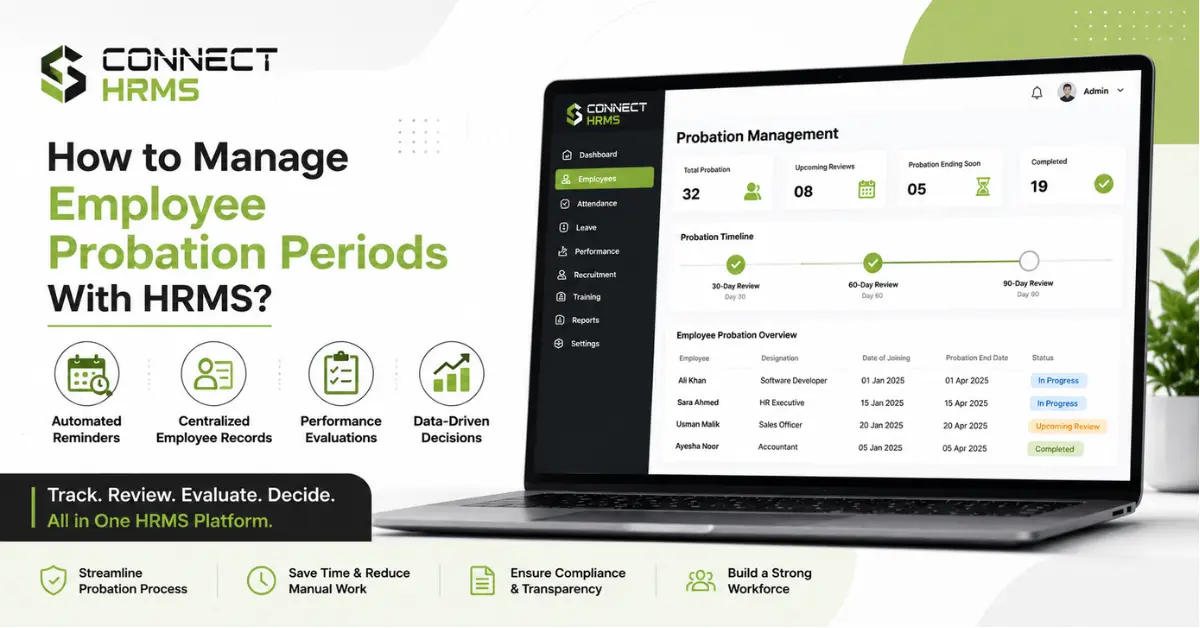
Centralized Employee Records
Every probation date, every review, every note a manager left, it all sits inside one employee record. Nobody’s digging through an inbox trying to remember what was said in a meeting from March.
Automated Expiry Reminders
Here’s where most manual setups quietly fail. HRMS platforms send probation reminders before the probation end date shows up, not after someone realizes it already passed.
Probation Timelines
You can actually see where someone stands. What’s done, what’s still pending, without asking three people and hoping one of them remembers.
Digital Documentation
Everything gets logged the moment it happens, which builds a real audit trail. Useful for compliance, sure, but also just useful when two people remember a conversation differently six months later.
Key Steps to Manage Probation With HRMS
This is roughly how it plays out, start to finish.
- Add probation dates during onboarding. The clock starts day one, tied into the employee’s onboarding record right from the start.
- Set automated reminders. HR alerts fire off ahead of each checkpoint.
- Define KPIs and goals. Give the employee something real to aim at, not vague expectations.
- Schedule regular check-ins. Short and frequent beats one big review crammed in at the end.
- Record manager feedback. As it happens, not weeks later from memory.
- Complete the final review. A proper performance evaluation, documented, not just a conversation in someone’s office.
- Confirm, extend, or end employment. Based on what’s actually written down, not a vague impression.
This whole process, done manually, quietly eats hours out of an HR person’s month. Connect HRMS was built specifically around this workflow so that time goes back to actual people work instead.
How HRMS Tracks Probation Reviews
Most companies land on three checkpoints.
| Review Stage | Purpose |
| 30-day review | Early check on onboarding progress and initial fit |
| 60-day review | Deeper look at performance and skill development |
| 90-day review | Final evaluation ahead of the confirmation decision |
Managers fill in digital evaluation forms instead of scrawling notes on paper that end up crumpled in a drawer somewhere. Performance history stacks up automatically across each stage, so by the 90-day mark, HR isn’t starting from scratch. There’s a full picture already sitting there, with a proper audit trail behind it.
What Should HR Evaluate During Probation?
Not just whether the person got their work done. It’s broader than that.
- Job performance against agreed goals
- Attendance and punctuality
- Skills and day-to-day productivity
- Teamwork and how they fit with the rest of the group
- Progress toward specific performance goals
- Training progress and how fast they’re picking things up
- Whether the role, long term, actually suits them
One rough week shouldn’t sink someone. One great project shouldn’t carry them either. Looking at the whole stretch matters.
What Happens After the Probation Review?
Three ways this can go.
Confirmation. The employee met what was expected. Role becomes permanent, HR records get updated, done.
Probation extension. Close, but not quite there yet. More time, clearer expectations this round.
Employment termination. The fit just isn’t right, whatever the reason. Having a documented review trail makes this call defensible later, which matters more than people realize until they need it.
Want to see what this actually looks like day to day? Connect HRMS can walk you through the probation tracking workflow directly.
Benefits of Managing Probation With HRMS
- Fewer missed deadlines and forgotten reviews
- Managers held accountable automatically, not by chasing them
- Evaluations that stay consistent across teams instead of varying by manager
- One place for every probation record, not five
- Faster decisions, backed by what’s actually documented
- An employee experience that doesn’t feel like an afterthought
Why Businesses Need Automated Probation Tracking
Probation doesn’t sit off to the side of everything else HR does. It’s connected to performance management, to how well the company tracks employee performance generally, and to whether leadership actually has visibility into the workforce or is just guessing.
Hand the repetitive parts, reminders, documentation, and scheduling over to HR automation, and the humans on the team get their attention back for the parts that actually need it. Real conversations. Fair calls. Decisions that hold up when someone questions them later.
Frequently Asked Questions
How do you manage an employee probation period?
Set goals early, check in regularly, write feedback down as it happens, and finish with a proper structured review before deciding anything.
How can HRMS help manage probation periods?
It keeps dates, reminders, reviews, and documentation in one place instead of scattered across spreadsheets and inboxes.
What is the purpose of a probation period?
To let both sides confirm the role actually fits before it becomes permanent.
What should be included in a probation review?
Performance, attendance, skills, teamwork, progress against goals, and whether the role suits them overall.
How do you track employee probation periods?
Through a system logging dates, sending reminders, and storing review notes and manager feedback somewhere everyone can find them.
What happens when an employee passes probation?
Employment gets confirmed, and HR records update to reflect permanent status.
What happens if an employee fails probation?
Either an extension for more time to improve, or the employment ends, depending on how far off things are.
Can HRMS send probation expiry reminders?
Yes, automated alerts go out ahead of the probation end date so nothing gets missed.
What should HR assess during probation?
Goal performance, attendance, skill growth, teamwork, and how well they’re settling into the role.
How often should probation reviews be conducted?
Most companies stick to 30, 60, and 90 day checkpoints, though it varies by role and company policy.
Is a 3 month or 6 month probation period better?
Depends on the role. Simple positions often suit three months. Senior or complex roles usually need the extra runway of six months.
How does probation management improve employee performance?
Regular feedback early on lets people adjust course fast, instead of waiting for one review at the end of the year to find out something was wrong the whole time.
Conclusion
Manual probation tracking leaves too much to chance, missed deadlines, inconsistent reviews, decisions nobody can fully explain later. An HRMS closes that gap by keeping dates, reminders, and documentation in one reliable place.
If spreadsheets are still running your probation process, it’s probably costing you more than you realize. Connect HRMS can help set up something that actually holds up. Reach out at +971 457 13703 or +92 300 1110365, or email info@connecthrms.com.